C++ Vector and String
Published:
Overview
std::vector is the default general-purpose sequence container when contiguous storage and indexed access are useful. std::string provides similar indexed, contiguous storage for characters together with text-specific search, slicing, and conversion operations.
This guide uses C++20 where it materially simplifies an operation and labels those cases explicitly. The core container operations are available in earlier standards.
Common Includes
#include <algorithm>
#include <iostream>
#include <iterator>
#include <string>
#include <vector>
Vector Initialization
std::vector<int> nums;                    // empty
std::vector<int> fixed_size(5);           // [0, 0, 0, 0, 0]
std::vector<int> filled(5, -1);           // [-1, -1, -1, -1, -1]
std::vector<int> values = {10, 20, 30};   // exact values

int rows = 3;
int cols = 4;
std::vector<std::vector<int>> grid(rows, std::vector<int>(cols, 0));
Be careful with parentheses versus braces:
std::vector<int> a(10, 2);                // ten elements, all 2
std::vector<int> b{10, 2};                // two elements: 10 and 2
Construct from a range:
int raw[] = {1, 2, 3};
std::vector<int> nums(std::begin(raw), std::end(raw));
Basic Vector Operations
std::vector<int> nums = {1, 2, 3};

nums.push_back(4);
nums.emplace_back(5);
nums.pop_back();

int first = nums[0];                      // no bounds check
int safe = nums.at(0);                    // throws if invalid

int n = static_cast<int>(nums.size());
bool empty = nums.empty();front(), back(), and pop_back() require a non-empty vector. operator[] requires a valid index and performs no check; an invalid index causes undefined behavior. at(index) checks the index and throws std::out_of_range when it is invalid.
Insert and erase:
std::vector<int> nums = {1, 2, 4};

auto inserted = nums.insert(nums.begin() + 2, 3);
                                            // [1, 2, 3, 4], points to 3
auto next = nums.erase(nums.begin() + 1); // [1, 3, 4], points to 3
next = nums.erase(nums.begin() + 1, nums.end());
                                            // [1], returns nums.end()
nums.clear();
Read these operations from the destination position:
insert(position, value)places the value immediately beforepositionand returns an iterator to the inserted element.erase(position)removes one element and returns an iterator to the element that followed it.erase(first, last)removes the half-open range[first, last)and returns an iterator to the element that followed the range.
The position and range iterators must belong to this vector. Passing end() to the single-element erase overload is invalid.
Remove by value:
std::vector<int> nums = {1, 2, 3, 2};

auto it = std::find(nums.begin(), nums.end(), 2);
if (it != nums.end()) {
  nums.erase(it);                         // removes first 2
}

nums.erase(std::remove(nums.begin(), nums.end(), 2), nums.end());
std::remove does not change the vector’s size. It moves retained elements toward the front and returns the new logical end; erase then destroys the unwanted tail. This is the erase-remove idiom.
C++20 expresses the intent directly and returns the number erased:
std::erase(nums, 2);
std::erase_if(nums, [](int value) { return value < 0; });
Size, Capacity, and Reallocation
size() is the number of live elements. capacity() is the number of elements the current allocation can hold before the vector has to allocate again.
std::vector<int> nums;

nums.reserve(1000);                       // capacity changes, size stays 0

for (int i = 0; i < 1000; ++i) {
  nums.push_back(i);                      // no reallocation within reserved capacity
}

nums.resize(10);                          // size becomes 10; new ints are 0
When a vector grows beyond capacity:
- It allocates a larger contiguous heap buffer.
- It moves or copies existing elements into the new buffer.
- It constructs the new element.
- It destroys the old elements and releases the old buffer.
Pointers, references, and iterators into the old buffer are invalid after reallocation.
Without reallocation, insertion invalidates iterators and references at or after the insertion position. Erasure invalidates iterators and references at or after the first erased element. clear() invalidates all iterators, pointers, and references to elements.
std::vector<int> nums = {10, 20, 30};
int* ptr = &nums[0];

nums.push_back(40);                       // may reallocate

// ptr may now be dangling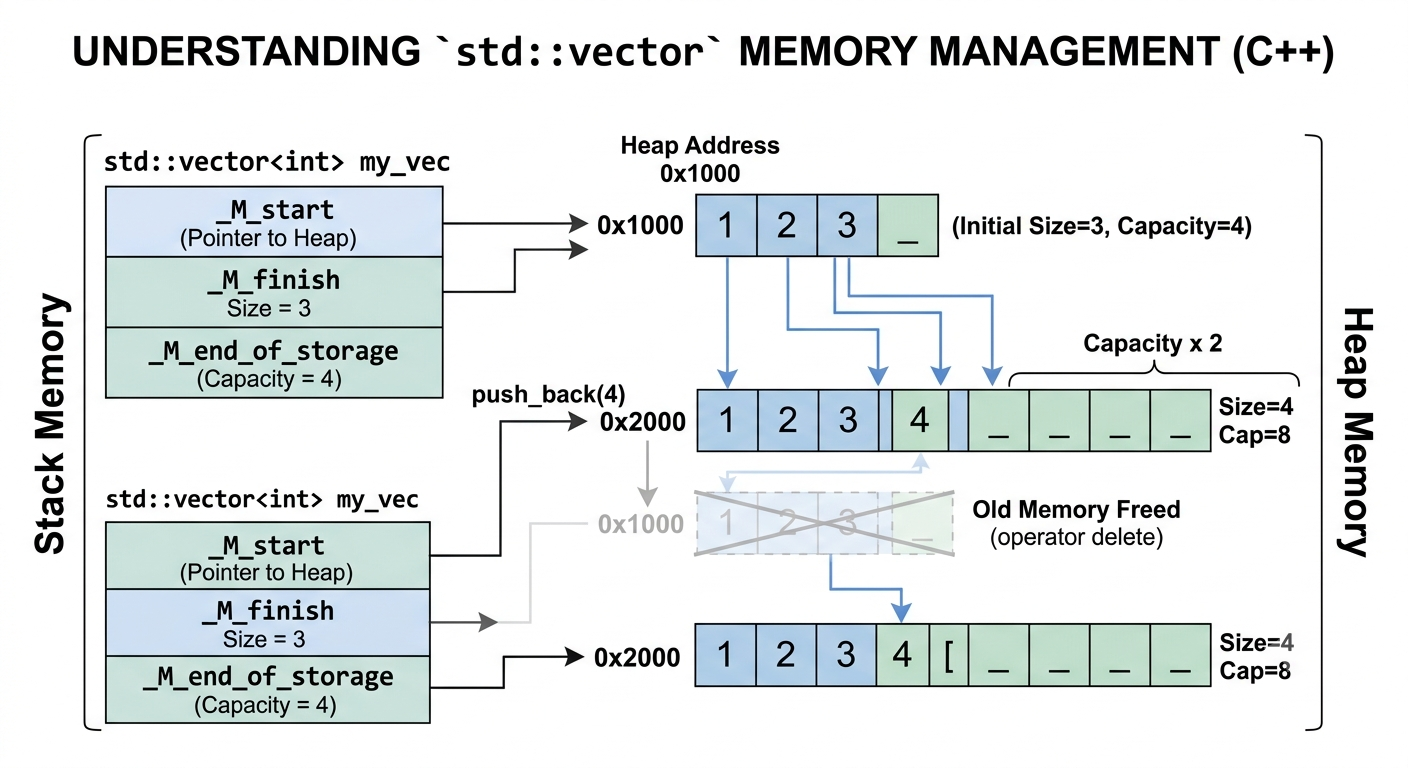
push_back vs emplace_back
push_back appends an existing object or temporary. emplace_back receives constructor arguments and builds the object directly in vector storage.
struct Point {
  int x;
  int y;

  Point(int x_value, int y_value) : x(x_value), y(y_value) {}
};

std::vector<Point> points;

points.push_back(Point(1, 2));            // temporary, then move/copy
points.emplace_back(3, 4);                // construct in place
emplace_back is not automatically faster. It is useful when the caller has constructor arguments rather than an existing object. Prefer push_back when an object already exists because it states the operation directly and avoids surprising implicit constructor selection.
Iteration
for (int x : nums) {
  // read x
}

for (int& x : nums) {
  x *= 2;
}

for (const auto& x : nums) {
  // read without copying
}

for (int i = 0; i < static_cast<int>(nums.size()); ++i) {
  nums[i] += 1;
}
String Basics
std::string behaves like a character vector with string-specific helpers.
std::string s = "hello";

s.push_back('!');
s.pop_back();
s += " world";

char first = s[0];
int n = static_cast<int>(s.size());
bool empty = s.empty();
As with vector, indexed access requires a valid index, and front(), back(), and pop_back() require a non-empty string. Use at() when an exception on an invalid index is the desired contract.
Substring, find, erase, and insert:
std::string s = "abcdef";

std::string part = s.substr(1, 3);        // start at 1, copy 3 chars: "bcd"

auto pos = s.find("cd");                 // search from position 0
if (pos != std::string::npos) {
  s.erase(pos, 2);                        // remove "cd"
}

s.insert(2, "XX");                      // insert before character index 2
substr(position, count) copies at most count characters beginning at position. A position greater than size() throws std::out_of_range; a count extending past the end is truncated.
find(needle, start_position) returns the index of the first match at or after the starting position. It returns std::string::npos when there is no match. Because npos is a special unsigned value, compare against it directly rather than converting the result to int.
String modifiers can reallocate storage. Unless an operation’s contract explicitly preserves them, reacquire iterators, pointers, references, and c_str()/data() results after modifying the string.
Conversions:
int x = std::stoi("123");
long long y = std::stoll("123456789");
std::string text = std::to_string(42);
Sort characters:
std::string s = "dcba";
std::sort(s.begin(), s.end());            // "abcd"
Frequency array:
std::vector<int> freq(26, 0);

for (char ch : s) {
  ++freq[ch - 'a'];
}
Complexity
| Operation | vector | string |
|---|---|---|
| Index access | O(1) | O(1) |
| Push at end | O(1) amortized | O(1) amortized |
| Insert/delete middle | O(n) | O(n) |
| Search unsorted content | O(n) | O(n) |
Checklist
- Use
vectoras the default container for indexed sequential data. - Use
reserve()when the final number of appended elements is known. - Use
resize()when the vector should actually contain that many elements. - Treat vector reallocation as invalidating existing pointers, references, and iterators.
- Check non-emptiness before calling
front,back, orpop_backwhen emptiness is possible. - Use the iterator returned by
erasewhen continuing a traversal. - Use
const auto&in loops when elements are expensive to copy.
Leave a Comment