Inside Apache Kafka: Partitions, Replication, Consumer Groups, and KRaft
Published:
1. Introduction
The Basic Abstraction
Kafka is built around the movement and storage of events between systems. An event may represent a business action, an operational signal, a database change, or any other fact that another system may need to observe.
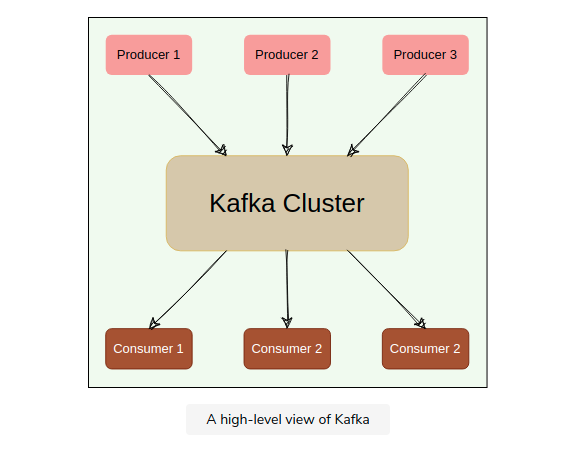
In a direct service-to-service design, the system that creates an event must often know which downstream systems should receive it. Kafka introduces an intermediate durable stream. The producing system writes the event once, and multiple consuming systems can read it independently.
producer -> Kafka -> consumer A
                  -> consumer B
                  -> consumer C
A producer is an application that writes data to Kafka. A consumer is an application that reads data from Kafka. Kafka sits between them as a storage and transport layer rather than as a direct remote procedure call between services.
The unit written to Kafka is a record. A record contains a value and may also include a key, timestamp, and headers:
key:   order-123
value: {"event": "OrderCreated", "order_id": 123}
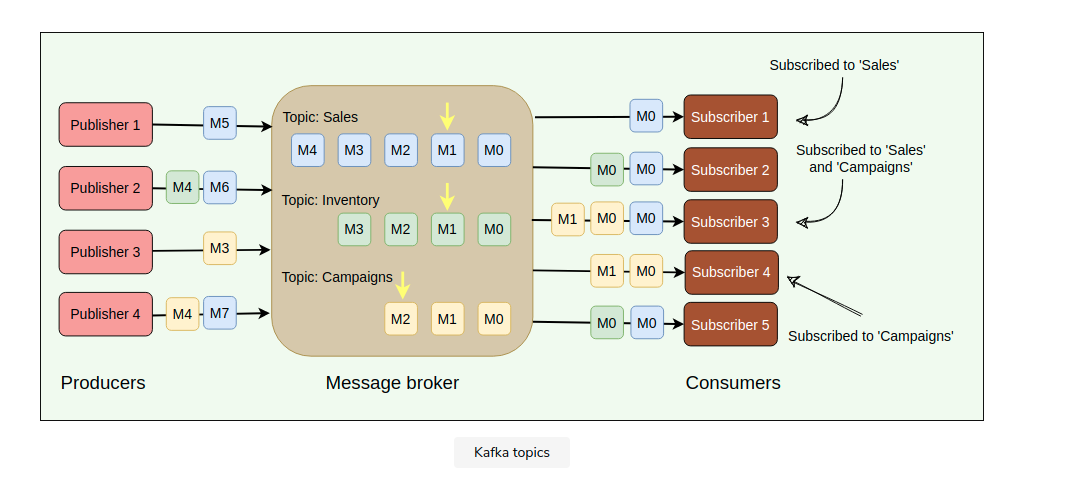
Kafka does not store all records in one undifferentiated stream. Records are written to named streams called topics. A topic is usually organized around a data contract or event category.
orders topic
payments topic
application-logs topic
At the simplest level, Kafka can be described as:
producer writes a record to a topic
consumer reads records from that topic
This model is intentionally incomplete. Kafka’s distributed architecture exists because a topic may receive more traffic, contain more data, and require more availability than a single server can provide.
The Kafka Cluster
A Kafka server is called a broker. A Kafka cluster is a group of brokers that together store topic data, serve client requests, and replicate records for fault tolerance.
Kafka cluster
  Broker 1
  Broker 2
  Broker 3
Kafka’s architecture can be separated into three planes:
- The data plane stores and transfers application records.
- The control plane stores and changes cluster metadata.
- The client plane contains producers, consumers, and administrative clients that use cluster metadata to send requests to the correct brokers.
Data Plane
Brokers form Kafka’s data plane. They receive writes from producers, store records in partition logs, replicate records to other brokers, and serve reads to consumers.
For fault tolerance, Kafka usually stores multiple copies of each partition. Each copy is a partition replica. One replica is the active copy for reads and writes; this active replica is the leader for the partition. The other replicas are followers. Followers copy data from the leader and can become replacement leaders if the current leader fails. Replication is therefore scoped to individual partitions, not to whole brokers.
Control Plane
The control plane stores and updates cluster metadata: which brokers exist, which topics exist, how many partitions each topic has, where replicas are placed, and which broker currently leads each partition.
In modern Kafka, this metadata is managed through KRaft, Kafka’s built-in metadata quorum. One controller is active at a time, and controller nodes replicate the metadata log so another controller can take over if the active one fails.
The same Kafka process may be configured as a broker, a controller, or both, but the responsibilities are separate.
Client Plane
The client plane consists of producers, consumers, and administrative clients. Clients are not passive endpoints. They cache cluster metadata, choose partitions, batch records, retry failed requests, refresh stale metadata, and track consumption progress.
A producer uses metadata to find the broker leading the partition it needs to write. A consumer uses metadata and group assignment state to fetch from the partitions it owns. An administrative client uses metadata APIs to create topics, alter configurations, and inspect the cluster.
At this stage, the important distinction is:
brokers      -> store and serve records
controllers  -> manage cluster metadata
clients      -> use metadata to produce, consume, and administer
From One Topic Log to Partitions
If a topic were stored as one log on one server, it would have one ordered sequence of records:
orders: [0] [1] [2] [3] [4] ...
That design is simple, but it creates several limits. One server must accept all writes, store all data, serve all reads, and remain available for the topic to function.
Kafka scales a topic by splitting it into partitions. A partition is still an ordered log, but a topic can have many partition logs distributed across brokers:
orders-0: [0] [1] [2] [3] ...
orders-1: [0] [1] [2] ...
orders-2: [0] [1] [2] [3] [4] ...
Each partition has its own offsets. An offset is meaningful only within one partition, so a Kafka position is identified by the combination of topic, partition, and offset:
(topic = orders, partition = 2, offset = 5)
Offset 5 in orders-2 has no ordering relationship with offset 5 in orders-0. Kafka preserves order inside one partition, not across every partition in the topic.
This creates the first important design tradeoff:
one partition  -> simple ordering, limited parallelism
many partitions -> more parallelism, ordering scoped per partition
For every record, Kafka must determine both the topic and the partition within that topic. The producer can specify the partition directly, or the producer client can select one using the configured partitioning strategy. The details of partition selection matter for ordering and load distribution, so they are treated separately after the partitioned-log model is established.
Topic Definitions Are Metadata
A Kafka topic is not only a name. It is cluster metadata. When a topic is created, Kafka records several facts about it:
- The topic name
- The number of partitions
- The replication factor
- The broker assignment for each partition replica
- Topic-level configuration such as retention, cleanup policy, compression behavior, and minimum in-sync replicas
A topic can be created explicitly by an administrator or by an application using Kafka’s Admin API. Operationally, explicit creation is usually preferable because topic names, partition counts, replication factors, and retention policies are part of the system’s data contract.
Conceptually, topic creation is a metadata operation:
create topic orders
  partitions: 12
  replication factor: 3
  retention: 7 days
The result is not one physical object. Kafka creates metadata for multiple partition logs and assigns replicas for those partitions across brokers:
orders-0 replicas -> Broker 1, Broker 2, Broker 3
orders-1 replicas -> Broker 2, Broker 3, Broker 4
orders-2 replicas -> Broker 3, Broker 4, Broker 1
...
Some clusters allow automatic topic creation. In that mode, a producer or consumer referencing a missing topic can cause Kafka to create it using broker defaults. This may be acceptable in development, but it is risky in production. A spelling error can create a real topic, and default partition or retention settings may not match the intended workload.
Changing Topic Definitions
Some topic properties can be changed after the topic exists. Others are effectively structural.
The number of partitions can be increased. It cannot be decreased in place. Increasing partitions adds new logs to the topic and allows more parallelism, but it can change the mapping from keys to partitions for future records. Existing records stay in their original partitions.
For keyed topics, this matters:
before: hash(order-123) -> orders-2 out of 6 partitions
after:  hash(order-123) -> orders-9 out of 12 partitions
After the partition count changes, new records for the same key may be written to a different partition than older records. Kafka does not move old records to preserve lifetime key ordering.
Topic-level configuration can also be altered. Examples include retention time, retention size, cleanup policy, maximum message size, and min.insync.replicas. These changes affect how Kafka manages the topic from that point forward, but they do not change the fundamental identity of existing records.
The replication factor can be changed through partition reassignment. This is not just a small configuration edit. Kafka must add or remove replicas, copy data to new brokers, catch replicas up, and then update the partition assignment metadata.
Several properties should be treated as part of the topic’s contract rather than as casual runtime settings:
- The topic name
- The meaning of records in the topic
- The partition key strategy
- The expected ordering boundary
- The initial partition count
- The replication and retention requirements
Changing these later may be possible, but it can affect producers, consumers, ordering assumptions, storage, and recovery behavior.
Metadata Propagation
Topic definitions and partition assignments are stored in the KRaft metadata log. The active controller is responsible for accepting cluster metadata changes and appending them to that replicated log.
A simplified creation flow is:
1. Admin client sends CreateTopics for orders.
2. Kafka validates the request.
3. The active controller appends topic metadata to the KRaft metadata log.
4. The metadata record is committed by the controller quorum.
5. Brokers receive the new metadata.
6. Brokers create or open the required partition replicas.
7. Clients learn the topic through metadata refresh.
The metadata log is the authoritative source of the topic’s existence and structure. Brokers do not independently invent their own view of the topic. They learn the committed metadata from the controller.
Propagation is not the same as instantaneous visibility at every client. After a topic is created, some clients may still have an older metadata cache. They learn the new topic or new partition layout when they refresh metadata, when a request fails with a metadata-related error, or when their periodic metadata refresh occurs.
Client Discovery
A producer or consumer is not usually configured with every broker. It is configured with one or more bootstrap broker addresses:
bootstrap.servers=broker-1:9092,broker-2:9092
These addresses are entry points. A client connects to one reachable bootstrap broker and requests cluster metadata. The metadata response tells the client which brokers exist, which topics and partitions are relevant to the request, and which broker currently leads each partition.
For a producer, the usual flow is:
1. Connect to a bootstrap broker.
2. Request metadata for the target topic.
3. Learn the topic's partitions and their current leaders.
4. For each record, determine the target partition.
5. Send Produce requests directly to the partition leaders.
The producer determines the target partition before batching and sending the record. After the partition is selected, the producer uses metadata to find the current leader for that partition and sends the Produce request to that broker.
For a topic such as orders, a producer keeps metadata for the topic’s partitions and leaders:
orders-0 -> leader Broker 1
orders-1 -> leader Broker 2
orders-2 -> leader Broker 3
If the producer receives records that belong in different partitions, it can route each record to the correct leader and maintain separate batches per partition:
record A -> orders-0 batch -> Broker 1
record B -> orders-2 batch -> Broker 3
record C -> orders-1 batch -> Broker 2
For a consumer, the flow is similar, but the consumer also joins a consumer group and receives partition assignments:
1. Connect to a bootstrap broker.
2. Discover the group coordinator.
3. Join the consumer group.
4. Receive assigned topic partitions.
5. Fetch records from the leaders for those partitions.
Clients can list topics through administrative APIs, but normal producers and consumers usually request metadata for the topics they intend to use rather than requiring a full cluster-wide topic listing.
Authorization also affects what a client can see. A cluster may contain many topics, but a client should only be able to describe, read, or write topics permitted by its credentials and ACLs.
Consumer Topic Discovery
A consumer usually discovers topics through its subscription configuration rather than by scanning the cluster first.
The most explicit form is a named subscription:
subscribe(["orders", "payments"])
In this case, the consumer already knows the topic names. It uses Kafka metadata requests to discover whether those topics exist, how many partitions they have, and which brokers currently lead those partitions. After joining its consumer group, it receives assignments for some or all of those partitions.
A consumer can also use a pattern subscription:
subscribe(pattern = "orders-.*")
With a pattern subscription, the client periodically refreshes metadata and matches visible topic names against the pattern. If a new matching topic is later created, the consumer group can rebalance so the new topic’s partitions are assigned to group members.
Administrative clients can request a topic listing for the cluster. That is useful for tooling, monitoring, validation, and provisioning workflows. It is not normally required for a consumer whose topic set is part of application configuration.
Topic discovery is also constrained by authorization. If access control is enabled, a consumer may not be allowed to describe or read every topic in the cluster. From that consumer’s perspective, unauthorized topics may be invisible or unusable even though they exist.
The practical model is:
explicit subscription -> metadata for named topics
pattern subscription  -> metadata refresh plus pattern matching
admin listing         -> operational discovery of visible topics
authorization         -> limits what the client can discover or use
Concurrent Topic Creation
Topic names are unique within a Kafka cluster. Two topics with the same name cannot coexist in the same cluster.
If two producers or administrative processes attempt to create the same topic concurrently, Kafka resolves the conflict through the metadata controller. The topic creation is serialized as a metadata operation. One request can create the topic; the other observes that the topic already exists and receives a topic-already-exists error.
Kafka does not merge two different definitions for the same topic name. If one request attempts to create orders with 12 partitions and another attempts to create orders with 48 partitions, the first successful creation establishes the topic. The second request fails because the name is already present. Changing the partition count or configuration after that requires an explicit alter operation.
This is another reason production systems usually provision topics deliberately rather than letting every producer create topics opportunistically. Topic creation defines shared cluster state, not only a local producer preference.
Partition Leaders
A broker can store partitions from many topics. It can be the leader for some partitions and a follower for others at the same time.
Broker 1:
  leader   orders-0
  follower orders-1
  leader   payments-2
  follower inventory-0

Broker 2:
  follower orders-0
  leader   orders-1
  follower payments-2
  leader   inventory-0
Replication is defined per partition, not per broker. There is no requirement that one broker be an exact replica of another broker. Instead, each topic partition has its own replica set.
For example, the orders-0 partition may have three replicas:
orders-0 replicas:
  Broker 1: leader
  Broker 2: follower
  Broker 3: follower
Those three replicas all correspond to the same partition log: orders-0. The follower replicas for orders-0 are expected to contain the same ordered records as the leader after they have caught up, although they may temporarily lag behind.
At the same time, Broker 2 may also be the leader for payments-4, Broker 3 may be the leader for inventory-1, and Broker 1 may store follower replicas for unrelated topic partitions. Broker contents are therefore a mix of partition replicas, not a mirror of another broker.
The broker that currently hosts the leader replica is the broker that leads that partition. Producers write to the partition leader. Followers copy data from that leader and can become replacement leaders if the current leader fails.
The producer’s write path is:
record -> topic -> partition -> broker that leads the partition
For a record written to the orders topic with key order-123, the path is:
producer creates OrderCreated(order-123)
-> topic: orders
-> key: order-123
-> selected partition: orders-2
-> current leader for orders-2: Broker 3
-> producer sends the record to Broker 3
Broker 3 appends the record to the orders-2 log. Follower replicas on other brokers copy the appended data so another broker can take over if Broker 3 fails.
Consumers, Groups, and Retained Logs
A conventional message queue is often a temporary handoff mechanism. A producer submits a message, one consumer processes it, and the queue removes or acknowledges the message. In that model, the queue primarily owns delivery state.
Kafka uses a retained-log abstraction. Records remain in the partition log until the topic’s retention or compaction policy removes them. Reading a record does not delete it.
A consumer therefore needs a position in each partition it reads. That position is an offset. Kafka conventionally stores the next offset the consumer should read, not the last offset it has already processed.
orders-2: [0] [1] [2] [3] [4] [5]
consumer position: next offset = 4
This means the consumer has processed records before offset 4 and should next read offset 4. Another consumer application can have a different position in the same partition.
A consumer group is a set of consumers that cooperate to read a topic. Within one group, Kafka assigns each partition to one active consumer at a time. Across different groups, the same topic can be read independently.
Different consumer groups are independent, and each group maintains its own offsets:
orders topic
  -> payment-service consumer group
  -> inventory-service consumer group
  -> analytics consumer group
The payment service can be at offset 4000 while the analytics pipeline is replaying from offset 1000. Consumer-to-partition assignment is covered in the consumer group section later in the article.
This separation between stored records and consumer positions is why Kafka can support several useful patterns:
- Multiple applications can read the same record independently.
- A consumer can replay old records while they remain retained.
- A new application can start reading an existing topic from an earlier point.
- Consumers can divide partitions among themselves for parallel processing.
- The topic can serve as an integration history rather than only a transient queue.
Kafka is therefore better understood as a distributed, retained log than as only a message queue.
The Core Data Path
The core data path is:
1. A producer creates a record.
2. The record is assigned to a topic.
3. The topic's partitioning rule selects a partition.
4. The producer sends the record to the broker leading that partition.
5. The leader appends the record to the partition log.
6. Followers replicate the appended data.
7. Consumers fetch records from their assigned partitions.
8. Each consumer group commits offsets to record its progress.
Kafka avoids routing all traffic through one central broker. Clients first retrieve metadata that tells them which broker leads each partition. They cache that metadata and communicate directly with the relevant leaders.
The common path should therefore be:
client knows the leader -> client sends request directly to that broker
When a broker fails or leadership changes, clients refresh metadata and route to the new leader.
The Design Tradeoff
Kafka obtains high throughput by combining sequential log appends, batching, compression, operating-system page caching, and parallelism across partitions. It does not provide one globally ordered stream across an arbitrarily large cluster. Ordering is scoped to a partition, and parallelism is created by having multiple partitions.
The central tradeoff is:
more partitions -> more parallelism and distribution
more partitions -> more metadata, files, replicas, and coordination
Applications must choose the boundary within which ordering matters. Kafka then distributes those ordering domains across the cluster.
2. The Partitioned Log
Records and Record Batches
A Kafka record is the smallest logical unit written by a producer. It contains a value and may also include a key, timestamp, and headers:
topic:   orders
key:     order-123
value:   {"event": "PaymentAuthorized", "order_id": 123}
headers: trace-id, schema-id, source-service
Kafka treats the key and value as byte arrays. The producer client uses serializers to turn application objects into bytes before the record is sent. The broker stores bytes; it does not understand the business meaning of an OrderCreated or PaymentAuthorized event unless external tooling such as a schema registry is used.
The key has two different roles. It can be part of the record’s business identity, and it can also influence partition selection. If related records use the same key, the producer partitioner can place them in the same partition so consumers observe them in partition order.
After serialization and partition selection, the record is placed into an in-memory producer accumulator. The accumulator is organized by topic partition. That detail is important: Kafka does not build one arbitrary batch for the whole topic. A batch is scoped to a single topic partition.
orders-0 batch: record A, record B
orders-1 batch: record C
orders-2 batch: record D, record E, record F
When a batch is ready, the producer sends it to the broker that currently leads that partition. The broker appends the batch to the corresponding partition log.
Records are therefore normally transmitted and stored in batches rather than as independent network and disk operations. A record batch carries shared metadata such as compression information, producer identity, producer epoch, base sequence number, timestamps, and transactional markers when transactions are used.
Batching matters because fixed costs are paid once for many records:
- One network request can carry many records.
- Compression is more effective across a batch.
- The broker performs fewer append operations.
- Consumers can fetch and deserialize data in groups.
The producer controls this latency-throughput tradeoff through settings such as batch.size and linger.ms. batch.size limits how large a partition batch can become before it is sent. linger.ms allows the producer to wait briefly for more records to join a batch. A larger batching window may improve throughput and compression while adding queueing latency before transmission.
Offsets are assigned by the broker when records are appended to a partition log. The producer chooses the topic partition; the broker determines the final offset positions in that partition.
producer batch for orders-2
        |
        v
broker appends to orders-2
        |
        v
records receive offsets 105, 106, 107
This is why records, batches, and offsets are all partition-scoped concepts. A batch belongs to one topic partition, and the offsets assigned to its records are meaningful only within that partition.
Ordering Boundaries
Kafka guarantees ordering within a partition, subject to the producer using configurations that preserve the intended send order. It does not merge all topic partitions into one total order.
Suppose an application publishes:
order-created
payment-authorized
order-shipped
If all three records use order-123 as the key, the producer’s partitioner normally maps them to the same partition. Consumers of that partition observe the records in append order.
If the records are written to different partitions, Kafka does not define their relative order. Wall-clock timestamps do not create a cluster-wide ordering guarantee.
The key is therefore not merely descriptive metadata. It defines locality and often defines the application’s ordering domain.
Partition Selection and Hot Keys
Partition selection determines which partition log receives a record. It happens on the producer side before the record is sent to a broker.
The broker does not normally choose a partition for a producer record. The broker receives a Produce request for a specific topic partition, validates that the partition exists and that the broker is the current leader, then appends the record to that partition log. If the request is sent to the wrong broker or refers to stale metadata, the broker returns an error and the producer refreshes metadata.
The consumer also does not choose where a produced record is written. Consumers read from partitions after records have already been appended. In a consumer group, Kafka coordinates which consumer reads which partitions, but that is read assignment, not write partitioning.
There are three common cases:
- The application includes a concrete partition number on an individual record.
- The record has a key, and the producer partitioner maps the key to a partition.
- The record has no key, and the producer uses a load-balancing strategy across available partitions.
Explicit partitioning means the application bypasses the normal partitioner for that record:
topic = orders
partition = 2
key = order-123
In that case, the producer sends the record to orders-2 if that partition exists, regardless of what the default key-based partitioner would have selected. This is useful for specialized routing, but it couples application code to the topic’s partition layout.
The partitioning logic can also be customized. A producer can use the default partitioner or provide a custom partitioner implementation in the producer client. Custom partitioners are useful when the application needs a specific placement rule, but they become part of the data contract. If the rule changes, future records may be placed differently from historical records, which can affect ordering and consumer assumptions.
For keyed records, the producer normally hashes the serialized key and maps it to a partition. The exact mapping depends on the client partitioner and partition count.
partition = partitioner(serialized_key, available_partitions)
Records with the same serialized key are routed consistently while the relevant topic metadata remains compatible. This is useful for per-customer, per-account, or per-device ordering.
For example:
topic = orders
key = order-123
partitioner(order-123, orders partitions) -> orders-2
leader for orders-2 -> Broker 3
send record to Broker 3
Uniform hashing does not guarantee uniform traffic. A small number of high-volume keys can overload individual partitions:
customer-1     -> 20 records/s
customer-2     -> 18 records/s
global-config  -> 200,000 records/s
Even if keys are evenly distributed, global-config can dominate the broker leading its partition. A Kafka hotspot is frequently a partitioning problem rather than a cluster-wide capacity problem.
Increasing the partition count is not a transparent fix for keyed data. Because the key-to-partition mapping can change when the partition count changes, future records for a key may move to a different partition. Historical records remain in the old partition, weakening assumptions about lifetime ordering unless the application accounts for the transition.
Handling Hot Keys
Kafka cannot automatically split one key across partitions while preserving strict per-key ordering. If every record for global-config must stay in one ordered stream, then one partition must carry that key’s traffic. The mitigation depends on which requirement matters more: strict ordering for the hot key, or higher throughput.
Common approaches include:
- Change the key granularity. Instead of one broad key such as
global-config, use a more specific key such asglobal-config:region-us-eastorglobal-config:tenant-42. This spreads traffic while preserving ordering within the smaller key scope. - Shard the hot key deliberately. Add a shard suffix, such as
global-config#0throughglobal-config#15, and distribute records across those derived keys. This increases write parallelism, but consumers no longer receive one total order for the original logical key without additional merge logic. - Separate the hot stream. Move the high-volume key or event type to its own topic with a partitioning strategy designed for that workload. This prevents one dominant event type from interfering with unrelated traffic in the original topic.
- Reduce unnecessary writes. If the hot key represents state updates, upstream coalescing or compaction-friendly publishing may reduce repeated records that consumers do not need individually.
- Scale consumers and brokers around the affected partitions. This can help if the bottleneck is read-side processing or broker placement, but it does not remove the single-partition write limit for one strictly ordered key.
Each approach changes a contract. Changing key granularity changes the ordering boundary. Sharding a key changes consumer reconstruction requirements. Moving data to another topic changes the subscription and operational model. Hot-key mitigation is therefore an application design decision, not only a Kafka configuration change.
3. Log Storage Internals
Segments, Not One Infinite File
A partition appears to clients as one append-only log:
orders-2: [offset 0] [offset 1] [offset 2] ... [offset 25000000]
Kafka does not store that partition as one endlessly growing file. On disk, the partition is divided into log segments. A segment is a file that contains a contiguous range of offsets for one partition.
At any moment, one segment is the active segment. New records are appended to that active segment. When the segment reaches a configured size or age threshold, Kafka closes it and opens a new active segment. This process is called segment rolling.
For example, a partition may evolve like this:
Time 1:
orders-2/
  00000000000000000000.log   active, contains offsets 0-999

Time 2:
orders-2/
  00000000000000000000.log   closed, contains offsets 0-999
  00000000000000001000.log   active, contains offsets 1000-1999

Time 3:
orders-2/
  00000000000000000000.log   closed, contains offsets 0-999
  00000000000000001000.log   closed, contains offsets 1000-1999
  00000000000000002000.log   active, contains offsets 2000-...
The long number in the filename is the segment’s base offset. It is the first offset that can appear in that segment. A file named 00000000000000001000.log starts at offset 1000.
Each segment also has companion index files. A partition directory therefore contains groups of files with the same base offset:
orders-2/
  00000000000000000000.log
  00000000000000000000.index
  00000000000000000000.timeindex
  00000000000010485760.log
  00000000000010485760.index
  00000000000010485760.timeindex
The .log file contains record batches. The .index file helps map offsets to byte positions inside the .log file. The .timeindex file helps map timestamps to offsets. The next section describes those indexes in more detail.
Segmenting the log solves several operational problems:
- Kafka can delete old data by removing whole closed segment files.
- Kafka can compact older closed segments without rewriting the active segment.
- File sizes remain bounded instead of growing forever.
- Recovery and index rebuilding can operate segment by segment.
- The active write path remains a sequential append to one current file.
This is why retention and compaction usually operate on closed segments. Kafka does not delete one consumed record from the middle of the active log. It keeps appending, rolls segments over time, and later removes or rewrites eligible older segments according to topic policy.
Offset and Time Indexes
Kafka does not need an index entry for every record. The index files are sparse: they point to selected positions in the segment, and Kafka scans forward from the nearest indexed position when it needs an exact record.
The .index file maps relative offsets to byte positions in the .log file. The real file is binary, but conceptually it looks like this:
Segment file:
  00000000000000001000.log

Base offset:
  1000

Offset index:
  relative offset -> byte position in .log
  0               -> 0
  50              -> 4096
  120             -> 9832
  210             -> 16384
Because the segment base offset is 1000, relative offset 120 means absolute offset 1120.
absolute offset = base offset + relative offset
1120            = 1000 + 120
If Kafka needs to read offset 1150, it can use the index entry for relative offset 120, seek to byte position 9832, and scan forward in the .log file until it reaches offset 1150.
target offset: 1150
segment base:  1000
relative:      150

nearest index entry <= 150:
  relative offset 120 -> byte position 9832

seek to byte 9832
scan forward until offset 1150
The .timeindex file maps timestamps to offsets. It is also sparse. Conceptually:
Time index:
  timestamp              -> relative offset
  2026-07-04T10:00:00Z   -> 0
  2026-07-04T10:01:00Z   -> 80
  2026-07-04T10:02:00Z   -> 160
If a consumer asks Kafka to find records near 2026-07-04T10:01:30Z, Kafka can use the time index to find an approximate offset near that timestamp, then use the offset index and log scan to locate the actual record position.
This design keeps indexes smaller than the data itself. The log remains the authoritative representation; indexes accelerate access and can be rebuilt from log contents if necessary.
Sequential I/O and the Page Cache
Kafka’s storage design favors sequential append and sequential read patterns. The broker relies heavily on the operating system’s page cache rather than maintaining a separate application-level cache for all log data.
Recently written data is often still resident in memory when consumers fetch it. In that common case, the operating system serves the read from cached pages even though Kafka’s durable abstraction is disk-backed.
This explains an important operational point: high disk capacity is not sufficient by itself. Kafka performance depends on disk throughput, page-cache availability, network bandwidth, request queues, and the access pattern of consumers.
A consumer replaying old data may force reads from storage that are very different from the near-head traffic seen during steady state.
Retention
With the delete cleanup policy, Kafka removes closed segments according to configured time or size limits. Retention is independent of consumer progress.
producer appends record
        |
        v
record retained for configured policy
        |
        v
old segment becomes eligible for deletion
A slow consumer is not guaranteed indefinite access. If its position falls behind the log start offset, the records it needs may already have expired.
Storage capacity is approximately driven by:
ingress rate
x retention duration
x replication factor
/ compression ratio
+ filesystem and index overhead
This is only a planning approximation. Replication lag, segment deletion timing, tiered storage, and temporary reassignment copies can increase actual usage.
Log Compaction
Compaction retains the latest known value for each key rather than preserving every historical version indefinitely.
offset 10: account-7 -> plan=basic
offset 18: account-7 -> plan=pro
offset 31: account-7 -> plan=enterprise
After compaction, the older values may be removed while the latest value remains. Offsets are not renumbered, so gaps can appear in the physical sequence exposed to consumers.
A null value for a key is commonly used as a tombstone. It indicates that the key should eventually be removed from the compacted state after the configured tombstone retention period.
Compaction is asynchronous. It does not guarantee that only one version of a key exists at every instant, and consumers must tolerate repeated and superseded values.
4. Client Routing and Metadata Refresh
Leader Distribution
A broker can lead some partitions while storing follower replicas for others. Leadership is distributed so producer and consumer traffic does not concentrate on one broker.
Broker 1: leader orders-0, follower orders-1
Broker 2: leader orders-1, follower orders-2
Broker 3: leader orders-2, follower orders-0
Distributing leaders spreads producer and consumer traffic. Distributing follower replicas across racks or availability zones reduces the chance that one infrastructure failure removes every copy.
Metadata on the Hot Path
Clients use metadata to keep the normal data path direct. A producer or consumer should not send every request through a central router. It should learn which broker leads the relevant partition and then communicate with that broker directly.
A metadata response can include:
- Cluster broker endpoints
- Topic and partition identifiers
- Current partition leaders
- Leader epochs
- Replica and in-sync replica information relevant to the response
The client caches this metadata and opens connections to the brokers it needs. For a producer writing to orders-2, the steady-state path is:
serialize record
-> select partition 2
-> find leader for orders-2 in local metadata
-> append to the orders-2 partition batch
-> send Produce request directly to leader
There is no metadata lookup on every record in the normal path. Metadata is refreshed periodically and when errors indicate that the cached view may be stale.
Stale Metadata
Cached metadata can become stale after leader election, broker failure, topic creation, partition reassignment, or a network change.
A client may send a request to the old leader and receive an error such as NOT_LEADER_OR_FOLLOWER or a leader-epoch-related response. The client refreshes metadata and retries according to its retry policy.
This is similar to many distributed routing systems:
fast path: use cached ownership metadata
change path: receive error, refresh metadata, retry
Client retry configuration is therefore part of Kafka’s availability behavior. A cluster can elect a new leader correctly while an application still experiences an outage because its metadata refresh, DNS, authentication, timeout, or retry settings prevent recovery.
5. Producer Protocol and Durability
The Write Path
A producer write has two distinct parts: the client-side preparation of the record and the broker-side append to the partition log.
A simplified write follows these steps:
- Serialize the key, value, and headers.
- Select the topic partition.
- Append the record to an in-memory batch for that partition.
- Group ready batches by destination broker.
- Send a Produce request to each partition leader.
- The leader validates and appends the batch.
- Followers fetch and replicate the appended data.
- The leader responds when the configured acknowledgement condition is met.
The important point is that the client-side send call is not the same as a committed write. A record can be accepted into producer memory before it has reached a broker. It can be sent to a broker before followers have replicated it. It can also be retried if the producer cannot determine whether the previous attempt succeeded.
The producer may have several requests in flight and may retry retriable failures. This is why ordering, idempotence, durability, and retry behavior are related rather than independent settings.
Acknowledgement Modes
The producer’s acks setting defines when the broker can report a Produce request as successful:
acks=0: the client does not wait for a broker response.acks=1: the leader responds after its local append.acks=all: the leader waits until the write satisfies the configured in-sync replica requirement.
acks=0 gives the producer the least feedback. The client may continue even if the broker never accepted the record. acks=1 confirms that the current leader appended the record locally, but followers may not have copied it yet. acks=all gives the strongest built-in producer acknowledgement, but it must be interpreted with the topic and broker replication settings.
acks=all does not mean every configured replica has persisted the record. It means the write has reached the required in-sync replicas under the partition’s current state and configuration. The relevant settings include the topic’s replication factor and min.insync.replicas.
The relevant durability relationship is:
acks=all
+ replication.factor
+ min.insync.replicas
+ unclean leader election policy
+ healthy replica placement
= effective failure tolerance
For example, with replication factor 3 and min.insync.replicas=2, an acks=all write requires acknowledgement from the leader and enough in-sync replicas to satisfy that minimum. If the ISR shrinks below the minimum, the broker rejects writes rather than acknowledging data with insufficient replication.
That choice trades write availability for durability. During a broker failure or network partition, the safer configuration may reject writes rather than acknowledge records with too few surviving copies.
Retries and Duplicate Risk
Retries are necessary because many failures are ambiguous from the producer’s point of view. A timeout does not prove that the broker failed before appending the batch; it only proves that the producer did not receive a successful response in time.
Consider this timeline:
1. Producer sends batch B.
2. Leader appends B.
3. Response is lost.
4. Producer times out.
5. Producer retries B.
Without duplicate detection, the leader can append the same logical records twice. The producer could not know whether the first attempt failed before or after the append.
Retries also interact with ordering. If multiple batches for the same partition are in flight at once, an earlier batch can fail while a later batch succeeds. Producer idempotence and broker-side sequence checks are what make safe retries practical without creating duplicates or accepting out-of-order sequences for a partition.
Idempotent Production
An idempotent producer receives a producer ID and attaches sequence numbers to batches for each partition. The broker tracks recent sequence state and can reject duplicate or out-of-order retries.
Conceptually:
producer ID 9001, orders-2:
  batch sequence 40 -> accepted
  batch sequence 41 -> accepted
  batch sequence 41 -> duplicate retry, not appended again
Idempotence is scoped to Kafka’s producer protocol. It protects retries while appending records to Kafka partitions. It is not general application deduplication. If an application restarts and constructs a new logical event twice, or two independent producers publish the same business operation, Kafka cannot infer that the payloads represent one event. Applications still benefit from stable event IDs when downstream effects must be deduplicated.
Backpressure and Timeouts
Records first occupy producer memory. If brokers are slow, unavailable, or throttling the client, unsent and unacknowledged batches accumulate.
Eventually the producer can block or fail sends because:
- Its buffer is exhausted.
- Delivery exceeds
delivery.timeout.ms. - A request exceeds its timeout.
- Metadata cannot be refreshed.
- The broker rejects the write due to ISR or authorization state.
An asynchronous send call is therefore not equivalent to durable acceptance. Applications must observe completion callbacks or returned futures and define what to do when delivery fails permanently.
In practice, producer reliability depends on both broker configuration and application behavior. A strong acks setting is only useful if the application checks delivery results, handles permanent failures, and avoids treating records queued in local memory as already durable.
6. Replication Internals
Leader and Follower Replicas
Kafka replicates at partition granularity. Followers issue fetch requests to the leader and append the returned record batches to their local logs.
producer -> leader
               |
               +-> follower A fetches
               |
               +-> follower B fetches
Replication uses the same broad pull model as consumption. The leader does not synchronously push each record to every follower.
The In-Sync Replica Set
The ISR contains replicas that are sufficiently caught up and active according to Kafka’s replication rules. A follower can leave the ISR if it fails or falls too far behind. It may rejoin after catching up.
replicas: [B1, B2, B3]
leader: B1
ISR: [B1, B2, B3]

B3 stops fetching:
ISR becomes [B1, B2]
ISR membership is operationally important because it influences which writes can be acknowledged and which replicas are safe leader candidates.
Log End Offset and High Watermark
The leader’s log end offset describes the end of its local log. The high watermark identifies the boundary up to which records are considered replicated sufficiently for ordinary committed visibility.
Suppose:
leader log end:     105
follower A end:     105
follower B end:     102
high watermark:     102
Offsets after the high watermark exist on the leader but are not yet replicated far enough to be exposed as committed data. This distinction prevents consumers from treating a leader-only tail as durable and then observing it disappear after leader failure.
As followers catch up, the high watermark advances.
Leader Epochs and Divergent Logs
Every leadership term has a leader epoch. Epoch information helps brokers and clients distinguish current leadership from stale leadership.
After failures and elections, a returning replica may contain a tail that does not belong to the current history. Kafka uses epoch and offset information to detect divergence and truncate the stale tail before the replica resumes normal replication.
Conceptually:
old leader B1: offsets 100-105 locally
committed boundary: 102
B1 becomes isolated
B2 elected leader and appends new 103-108
B1 returns with conflicting old 103-105
B1 truncates divergent tail and follows B2
Without truncation, the partition would contain two incompatible histories for the same offsets.
Leader Failure Timeline
Assume replication factor 3:
orders-2 replicas: B1, B2, B3
leader: B1
ISR: B1, B2, B3
Failure recovery proceeds approximately as follows:
- The controller learns that
B1is unavailable. - It selects an eligible replacement, normally from replicas considered safe under the cluster’s leader election policy.
- The controller records the new leader and leader epoch in cluster metadata.
- Brokers receive the metadata change.
- Clients using stale metadata receive errors or refresh proactively.
- Producers and consumers route to the new leader.
- When
B1returns, it reconciles its log and follows the current leader.
Kafka restores partition availability, but application recovery time also includes failure detection, controller processing, metadata propagation, client refresh, connection establishment, and retries.
Unclean Leader Election
If no safe replica is available, a system must choose between keeping the partition unavailable and electing a stale replica.
Electing a stale replica can restore service but discard records that existed only on the former leader or more current replicas. Disallowing that election preserves committed history but leaves the partition unavailable until a suitable replica returns.
This is a direct consistency-availability decision, not merely a tuning detail.
7. Consumer Fetching and Offset State
Pull-Based Consumption
Consumers fetch data rather than receiving unsolicited pushes. A Fetch request can ask for data from multiple partitions led by the same broker.
The request includes positions and fetch constraints. The response can include:
- Record batches
- High watermark
- Log start offset
- Last stable offset for transactional reads
- Current leader information when metadata is stale
- Preferred read replica information where configured
Pulling lets consumers control pace and batch size. It also means a slow consumer accumulates lag rather than forcing the broker to hold an application thread or push buffer for each message.
Fetch Position Versus Committed Offset
Two positions must not be confused:
- The current position is where the running consumer will fetch next.
- The committed offset is the stored recovery checkpoint for the consumer group.
A consumer can fetch and process records beyond its last committed offset. If it fails before committing, its replacement resumes from the earlier checkpoint and may process those records again.
committed offset: 100
consumer fetches: 100-109
consumer processes: 100-109
consumer crashes before commit
replacement resumes at: 100
This is the basis of common at-least-once behavior.
Kafka conventionally commits the next offset to read, not the last record already processed. After successfully processing offset 109, the consumer commits 110.
Where Offsets Live
Consumer group offsets are stored as Kafka records in the internal compacted topic __consumer_offsets. A group coordinator broker manages group state and offset requests for assigned groups.
A consumer can discover its coordinator by sending a coordinator lookup request to a broker. If coordinator ownership changes, the client discovers the new coordinator and retries.
This design uses Kafka’s own replicated log mechanisms to persist consumption checkpoints instead of maintaining offset files on every consumer.
Auto-Commit and Manual Commit
Auto-commit periodically records offsets based on the consumer’s progress. It reduces application bookkeeping, but it does not know whether every external side effect associated with returned records has completed safely.
Manual commit gives the application explicit control:
poll records
-> process records
-> complete required side effects
-> commit next offsets
This ordering supports at-least-once processing. It still permits duplicates if processing succeeds and the commit fails or is lost.
Committing before processing reverses the risk:
commit offsets
-> process records
-> crash
The restarted consumer skips records whose effects were never completed. That is at-most-once behavior from the application’s perspective.
Lag
Consumer lag is usually measured as the difference between the partition’s current end and the consumer group’s committed or observed position.
Lag is not a complete health metric. A group may intentionally process historical data, pause partitions, or commit in large batches. Conversely, low lag can coexist with repeated processing failures if offsets advance incorrectly.
Useful dimensions include:
- Lag in records
- Oldest unprocessed event age
- Processing latency
- Commit latency and failure rate
- Rebalance frequency
- Poll interval violations
- Downstream error rate
Event age is often more meaningful than record count because partitions can have very different record sizes and arrival rates.
8. Consumer Groups and Rebalancing
The Parallelism Model
Within a traditional consumer group, one partition is assigned to at most one active consumer at a time.
This is not a fixed 1:1 mapping between consumers and partitions. One consumer may read several partitions. If there are more consumers than partitions, some consumers in the group may have no partition assigned.
For example, if the orders topic has four partitions and one consumer group has two consumers:
orders-0 -> Consumer A
orders-1 -> Consumer A
orders-2 -> Consumer B
orders-3 -> Consumer B
If the same group later has four consumers, the assignment may become:
orders-0 -> Consumer A
orders-1 -> Consumer B
orders-2 -> Consumer C
orders-3 -> Consumer D
If the group has six consumers for four partitions, two consumers will not receive partitions from that topic. More consumers than partitions does not increase parallelism for a traditional consumer group.
Partitions are therefore both storage units and the upper bound on group parallelism.
Different groups remain independent:
The payment service, inventory service, and analytics service can each use a separate group and process the same topic independently.
Group Coordination
A group coordinator tracks membership, heartbeats, group epochs or generations, assignments, and committed offsets.
Consumers must continue heartbeating to remain members. They must also call or service polling frequently enough to demonstrate that processing has not stalled beyond the configured limit. These are different failure signals:
- Missing heartbeats indicate a dead or disconnected member.
- Exceeding the maximum processing interval indicates a member that is alive but not making acceptable polling progress.
When a member is removed, its partitions must be reassigned.
Why Rebalances Occur
A rebalance may be triggered by:
- A consumer joining
- A consumer shutting down
- A heartbeat or session timeout
- A subscription change
- Topic partition-count changes
- Coordinator movement
- An explicit group operation
During reassignment, applications must stop using revoked ownership and initialize newly assigned partitions.
Rebalance Examples
Consider a topic with four partitions and a consumer group with two members:
orders-0 -> C1
orders-1 -> C1
orders-2 -> C2
orders-3 -> C2
Example 1: A Consumer Joins
If a third consumer joins the group, the group coordinator computes a new assignment. Some partitions move to the new member:
Before:
orders-0 -> C1
orders-1 -> C1
orders-2 -> C2
orders-3 -> C2

C3 joins.

After:
orders-0 -> C1
orders-1 -> C1
orders-2 -> C2
orders-3 -> C3
The exact assignment depends on the assignor, but the principle is stable: the group changes ownership so work is redistributed across active members.
Example 2: A Consumer Fails
If C2 stops heartbeating, the coordinator eventually removes it from the group. Its partitions must move to surviving members:
Before:
orders-0 -> C1
orders-1 -> C1
orders-2 -> C2
orders-3 -> C2

C2 fails.

After:
orders-0 -> C1
orders-1 -> C1
orders-2 -> C1
orders-3 -> C1
C1 resumes orders-2 and orders-3 from the last committed offsets for the group. If C2 processed records but did not commit offsets before failing, those records may be processed again.
Example 3: Partitions Are Added
If the topic grows from four partitions to six, the group can receive assignments for the new partitions:
Before:
orders-0 -> C1
orders-1 -> C1
orders-2 -> C2
orders-3 -> C2

New partitions:
orders-4
orders-5

After:
orders-0 -> C1
orders-1 -> C1
orders-2 -> C2
orders-3 -> C2
orders-4 -> C1
orders-5 -> C2
Adding partitions increases the possible read parallelism for the group, but it may also affect producer key-to-partition mapping for future records, as discussed earlier.
Classic and Consumer Rebalance Protocols
Modern Kafka supports the earlier classic group protocol and the newer consumer group protocol introduced for more incremental, broker-driven coordination.
The classic model historically used a group synchronization process in which clients participated in assignment selection. Depending on the assignor, a rebalance could revoke broad ownership and create a stop-the-world pause for the group.
The newer consumer protocol moves assignment logic to the server and uses incremental reconciliation. Members can transition assignments without requiring the entire group to cross one global synchronization barrier for every change.
The operational principle remains the same: partition ownership is leased group state. A consumer must not continue processing a partition after the coordinator has revoked that ownership.
Rebalance Failure Example
Consider a consumer processing a large batch:
1. Consumer C1 owns orders-2.
2. C1 polls offsets 100-199.
3. Processing blocks on a database for longer than the allowed interval.
4. Coordinator removes C1 from the group.
5. orders-2 is assigned to C2.
6. C2 resumes from the last committed offset, 100.
7. C1's database call returns and C1 continues processing stale work.
If C1 does not stop or fence its work after losing ownership, C1 and C2 can perform overlapping side effects.
Applications should keep poll progress healthy, bound batch processing time, use rebalance callbacks correctly, and make downstream operations idempotent or fenced where concurrent stale work is dangerous.
9. Transactions and Exactly-Once Processing
The Problem Transactions Address
Suppose a service consumes from orders, transforms each record, writes to billing-events, and then commits the input offset.
Two independent operations are involved:
write output record
commit input offset
If the service crashes between them, it either duplicates output after retry or risks skipping input, depending on operation order.
Transactional Producer State
A transactional producer uses a stable transactional.id. Kafka assigns producer identity and epochs so that a newer producer instance can fence an older instance using the same transactional identity.
A transaction can include:
- Records written to multiple Kafka partitions
- Consumer offsets sent as part of the transaction
The producer writes data records and transaction markers. A transaction coordinator manages transaction state and ensures commit or abort markers are propagated to participating partitions.
Read Committed Isolation
Consumers configured with isolation.level=read_committed expose only committed transactional records. They use the last stable offset, which may be behind the high watermark while an earlier transaction remains open.
high watermark:      250
open transaction begins at: 240
last stable offset:  240
Even though later records may be replicated, a read-committed consumer cannot advance through undecided transactional data as if the transaction outcome were known.
Aborted transactional records remain part of the physical log but are filtered from the read-committed view using transaction metadata returned by the broker.
Scope of Exactly-Once Semantics
Kafka transactions can make a consume-transform-produce pipeline atomic within Kafka:
input offsets + Kafka output records -> one transaction
They cannot atomically include an arbitrary external database, HTTP request, email, or payment provider. Once an external system is involved, the workflow needs an integration pattern such as:
- Idempotency keys
- Transactional outbox
- Inbox or deduplication table
- Compare-and-set state transitions
- Fencing tokens
- Compensating operations
Exactly-once is therefore a property of a defined boundary, not a universal label for the entire application.
Long Transactions
Open transactions can delay the last stable offset and therefore delay read-committed consumers. Transaction timeout, coordinator availability, producer fencing, and abort handling all affect the operational behavior.
Transactions should be kept bounded. Treating one Kafka transaction as a long-running business workflow increases latency and failure complexity.
10. KRaft Metadata Quorum
Why Kafka Needs a Control Plane
The data plane stores application records, but the cluster also needs authoritative metadata:
- Broker registrations
- Topic definitions and IDs
- Partition replica assignments
- Current leaders and leader epochs
- ISR changes
- Configuration changes
- Security metadata
Modern Kafka stores and replicates this metadata using KRaft, Kafka’s Raft-based metadata quorum. ZooKeeper mode was removed in Apache Kafka 4.x and is legacy architecture.
Controllers and Brokers
Kafka processes can be configured as brokers, controllers, or both. Dedicated controller nodes are commonly used for production isolation.
One controller is the active metadata leader. Other controllers replicate the metadata log and can take over if the active controller fails.
controller quorum:
  C1 active leader
  C2 follower
  C3 follower

brokers:
  B1, B2, B3, ...
Brokers register with the controller quorum and receive metadata deltas. Clients still send record traffic directly to brokers; controller nodes are not proxies for Produce and Fetch requests.
Metadata as an Event Log
KRaft represents cluster changes as records in a replicated metadata log. Controllers replay the log to build an in-memory image of current cluster state.
For example:
create topic orders
assign orders-0 replicas [B1, B2, B3]
elect B1 leader for orders-0, epoch 7
remove B3 from ISR
elect B2 leader for orders-0, epoch 8
Snapshots allow a controller to restore state without replaying an indefinitely growing history from the beginning.
This log-based control plane creates an ordered source of truth for metadata changes. Brokers and clients may temporarily hold stale cached views, but epochs let the system reject operations based on superseded leadership.
Controller Failure
If the active controller fails:
- The remaining quorum members detect loss of the leader.
- A new controller leader is elected through Raft.
- The new leader reconstructs or already holds the committed metadata state.
- Cluster metadata management resumes.
Existing partition leaders may continue serving data during a brief controller transition. Operations requiring new metadata decisions, such as leader elections or administrative changes, depend on restoration of controller leadership.
The controller quorum should be sized and placed so a majority survives expected failure domains. A three-controller quorum tolerates one unavailable controller; a five-controller quorum tolerates two, at the cost of more coordination.
11. Failure Semantics and Distributed Systems Tradeoffs
An Acknowledged Write Can Still Depend on Configuration
Kafka’s durability is not one fixed guarantee.
With acks=1:
1. Leader appends record.
2. Leader replies success.
3. Record has not reached followers.
4. Leader fails.
5. Follower is elected.
6. Record may be absent.
With acks=all, sufficient in-sync replicas, and safe leader election, the acknowledged record has stronger survival properties. Misconfigured minimum ISR, poor replica placement, or unclean election can weaken the intended guarantee.
Network Partitions
A broker can be alive but unable to communicate with controllers, peers, or clients. Kafka uses registrations, heartbeats, epochs, and quorum-controlled metadata to prevent an isolated broker from remaining an authoritative leader indefinitely.
Clients may still experience:
- Timeouts while connected to an old leader
- Duplicate attempts after ambiguous responses
- Temporary unavailability while no eligible leader exists
- Metadata refresh storms
- Increased latency as replicas catch up
Failure is therefore a sequence of partial states rather than an instantaneous switch.
Availability Versus Durability
Several Kafka settings expose the same underlying choice:
- Require more replicas and reject writes during degradation.
- Accept writes with fewer copies and tolerate a larger loss window.
- Wait for a safe leader to return.
- Elect a stale leader and risk truncating newer data.
There is no configuration that maximizes availability, latency, and durability simultaneously under every partition and failure.
Replication Is Not Backup
Replication protects against broker and storage-device failures. It does not protect against every logical failure:
- An application can publish incorrect records to all replicas.
- An administrator can delete a topic.
- Retention can expire required history.
- A compromised credential can alter or delete data.
- A regional event can affect every replica if placement is not independent.
Recovery objectives may require remote replication, object-storage archival, tiered storage, or reproducible source systems in addition to ordinary partition replication.
12. Operating Kafka at Scale
Monitor Partitions, Not Only Brokers
Cluster-wide averages hide skew. One broker may lead the hottest partitions while aggregate CPU and disk appear healthy.
Monitor:
- Bytes and records in and out by broker and topic
- Request latency and queue time
- Under-replicated and offline partitions
- ISR expansion and shrink rates
- Leader distribution
- Produce and fetch error rates
- Disk utilization and log-directory failures
- Controller quorum health
- Consumer lag and oldest-event age
Capacity Has Several Independent Limits
A broker can become constrained by:
- Network ingress from producers
- Network egress to consumers and followers
- Disk write throughput
- Old-data disk reads
- Page-cache pressure
- CPU used for compression, encryption, and request handling
- File descriptors and partition count
- Request-handler and network-thread saturation
Replication multiplies traffic. A record written with replication factor three is received by the leader and then transferred to two followers. Multiple consumer groups can multiply read egress further.
Partition Count Is an Architectural Decision
Too few partitions limit parallelism and make individual partition hotspots larger. Too many partitions increase:
- Metadata size
- Open files and log segments
- Replica fetch work
- Leader-election work
- Reassignment duration
- Consumer assignment complexity
- Recovery time after broker failure
Partition count should be derived from throughput, required consumer parallelism, ordering domains, and expected growth. It should not be increased casually because keyed routing and operational cost may change.
Reassignment Is Live Data Movement
Adding brokers does not automatically redistribute all existing data. Partition reassignment creates new replicas, transfers log contents, catches them up, changes leadership where requested, and removes old replicas.
This consumes the same disk and network resources used by production traffic. Aggressive reassignment can increase request latency and replica lag, which can in turn shrink ISR and reduce write availability.
Throttle and stage reassignments according to workload headroom.
Schema Evolution
Kafka stores bytes and does not by itself ensure that every producer and consumer agrees on their meaning. Long retention and independent consumers make schema compatibility important.
Safe evolution normally requires:
- Stable event ownership
- Versioned schemas or compatible schema evolution
- Clear required and optional fields
- Consumers tolerant of compatible additions
- A policy for semantic changes, not only field syntax
An event log preserves old data, so a new consumer may need to understand records produced years earlier.
Multi-Region Design
Stretching one Kafka cluster across distant regions introduces controller quorum latency, replication latency, and correlated network-partition behavior into normal cluster operation.
A common pattern is:
regional Kafka cluster
-> asynchronous cross-cluster replication
-> independent remote cluster
This provides regional isolation but does not create synchronous global ordering. Disaster recovery must define replication lag, topic selection, consumer offset strategy, failover direction, and prevention of conflicting writes after failover.
Operational Rule of Thumb
Kafka works best when applications treat the following as explicit contracts:
- Partition key and ordering boundary
- Delivery and retry behavior
- Offset commit point
- Idempotency strategy
- Retention and replay window
- Schema compatibility policy
- Failure and disaster-recovery objectives
Kafka supplies durable partitioned logs and coordination protocols. It does not infer these application semantics automatically.
13. Conclusion
Kafka scales by dividing topics into ordered partitions, distributing those partitions across brokers, and allowing clients to communicate directly with partition leaders. Producers obtain throughput through batching and compression. Followers replicate partition logs and establish a committed boundary through replication progress. Consumers pull batches, maintain independent positions, and divide partitions through consumer groups.
The same abstractions create Kafka’s constraints. Ordering exists within a partition, not across a whole topic. Group parallelism is bounded by partition count. Acknowledgement strength depends on ISR and election policy. Offset commits coordinate recovery but do not make external side effects atomic. Transactions provide exactly-once behavior within a defined Kafka boundary, not across arbitrary systems.
KRaft supplies an ordered, replicated metadata control plane, while brokers continue to own the application data path. During failure, epochs, leader election, log truncation, metadata refresh, and client retries work together to restore service.
The useful mental model is:
topic -> partitioned logs
partition -> leader and replicas
producer -> append batches
consumer group -> leased partition ownership
offset -> recoverable processing position
KRaft -> authoritative cluster metadata
Understanding these mechanisms is what turns Kafka from a generic messaging component into a system whose performance, durability, and failure behavior can be reasoned about explicitly.
Leave a Comment